Search

DesignProcessTechnologyValue, A Conversation

Conversation regarding the architectural design process, and the technologies used.

Category

technology

Conversations Rule

I have been practicing architecture now since graduating in 1982 and becoming licensed in 1985. Working in design firms has always allowed me to participate in client meetings and project proposals – if you do the math, I have a lot of experience in both. 

For several years we utilized presentations to communicate to our clients – traditional models, boards, and formal static images to convey and communicate design. It got easier and faster with zip-a-tone, letraset, and Kroy lettering machines – anyone over 40 may remember these things. If you don’t, ask an old dude. 

But it was still always a presentation –a fixed message.

PowerPoint came online and we rejoiced! Now you could animate – present faster, easier, and cleaner than ever before – and you still can. But it felt just that…canned. 

PowerPoint gets a bad rap that it just doesn’t deserve. 

Now, you can be critical of a presenter, but not the software. We have ALL sat through presentations where slides are read to us.

It’s 2017PLEASE do not ever do a presentation where you read through the slides to an audience…EVER.

If you want a great resource for good presentation skills I recommend Presentations Field Guide” by David Sparks.
macsparkyemailfieldguidecover-jpg

And yet, we have found ourselves doing something differently

It’s subtle, but profound. Profound to the point others have been inquiring about how we do what we do.

It’s best explained this way:

I’ve referenced PowerPoint above.  We learned how to do good – great – PowerPoint presentations. Huge presentations, with many slides, and animations that made sense. We told a story. Got projects. 

Years ago, when called to a client’s office to visit about a possible project, we had an hour to load a computer with example project information, example process information, and information about ourselves. That meeting became a watershed moment in my career because instead of presenting to the client, we had a conversation. 

A conversation about them

Their needs, their desires, their concerns. And in having this conversation about THEM, we were able to show them how WE worked, problem solved, and could do the same for THEM. In the course of this conversation we opened software and exhibited HOW and WHY things were done. 

It was subtle, but profound. We opened the software and showed them. 

Not PowerPoint. Software. Whatever it needed to be. 

Looking back on this I have realized, clients know we work in software – why not let them see us work? Why hide behind the veil of PowerPoint? Let them see we know the software, how it works, and how it can work for them.  If they have an idea or question, show them the answer. 

How do you do this? 

Without a PowerPoint. 

Without a canned presentation. 

Without a net.

With a readiness for a conversation.

Ready to not only let them see WHAT you can do for them, but HOW. NOW, as you are talking with them.

I stated in my last post that you need to sleep with your software and hardware. Become familiar with it – comfortable with it. With this familiarity and comfort comes a confidence and nimble-ness (and, you will find, a wonderful nervousness) that allows you to converse by using the device.

Let a client SEE the active window- or five stacked on top of one another – on multiple desktops, in different operating systems, inside and outside of the office. 

It shows that you know the software.

And that you CAN do this for them. 

THIS IS MAGICAL. 

They become part of the process.

Conversation vs. Presentation:

  • Which do you think results in most memory retention? 
  • Which do you think results in a more pleasurable time (for all parties?)
  • Which do you think typically results in a “let’s do this again” kind of feeling? 
  • Which does not have a script? 

Be ready and know your software. Be “conversational” in your software.

Ever take a foreign language? Not me – but I know what it means when folks talk of being “conversational” in French, Spanish, Pig-Latin…you need to be conversational in your design software as well. 

Enter the Ipad.

On April 3, 2010, Apple introduced the iPad. It was reported to be magical. It was reported to be ground breaking. It was going to change things. It has.

The first version of it ended up being explained by critics as being for “content consumption.” One could digest the intellectual bounty of treasures online at their leisure – anywhere. They were pretty much correct.

Later versions of the device all reported to be for “content creation” and I admit it is great for that – I’ve gone through four versions. 

But we have a third “C” – the device is best for is CONVERSATION.

Conversation about our designs, about our client’s needs, and about every aspect of a project. 

Conversation with a client, 

with a building official, 

with a contractor – you get the idea.

Tina Fey said it best: Improvisation is magic. 

Take your stiff software, your standard hardware, and  mix it with your sketch software, your flow chart software, that spreadsheet software, those maps apps, that funky animation software, goofy 3D software, your marketing software, and that virtual meeting software. Add your Apple pencil and be ready to reference them at a moment’s notice.

Open one up and do it live – without a net, but WITH your client, their contractor, that building official and see the magic happen. 

Be ready to be nervous. 

Be ready to “undo” a few things. 

Be ready to have others jump in and want to be part of the conversation because they can’t help it. 

Everyone wants to be part of something magical. 

Be confident. 

Lead. 

You’ll be amazed where this can take you.

The age of canned presentations is done – you can quote me on that. 

Consumption is good,

Creation is great,

But Conversations rule. 

When was the last time you had a meaningful conversation with a client? Without a net?

Mac or PC – or both?

When we started this adventure as an office we found ourselves at a crossroads – Mac or PC?

We needed to replace our technology because it was at the end of its usable life. Our software was outdated  and our email Windows XP server software was discontinued and no longer supported – believe it or not, this was the domino that fell first to start the others falling.

Curse you, Windows!

WHY?

WHY would you turn your backs on such a great, reliable workhorse of an operating system like XP Pro?? WHY???!!!

Looking back now and seeing what Windows has developed, my intensity of the question is not so extreme anymore…

So, in the middle of the road, where do we go?

Our decision? Let’s see what’s possible. 

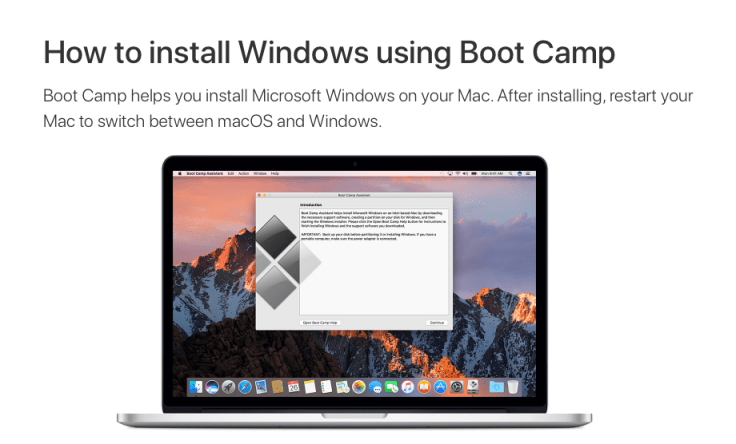
Boot Camp was possible.

screen-shot-2017-01-30-at-11-42-42-am

Boot Camp would let us run Windows on Macs!

No limits to what we can do, we thought. No problems, we thought. No “you can’t do that because…” we thought. So, we tried it.

We set up a test machine that was already a few years old and began loading software (I suggest you always have a machine you can set up and try it on).

What we found was amazing –  a older machine that shouldn’t be running  Boot Camp “this well” was humming right along.

Bring it, it said to us. So we did.

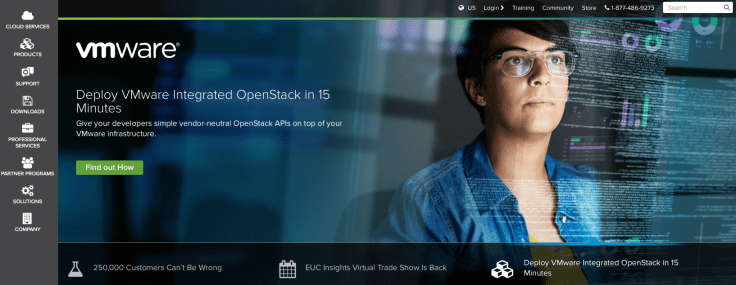
We pushed and found two virtual machine softwares: VMware and Parallels.

screen-shot-2017-01-30-at-11-32-41-am

screen-shot-2017-01-30-at-11-33-07-am

At the time, we found VMware had some graphic issues with Autodesk and Sketchup and Parallels did not…problem solved. Good-bye, Boot Camp.

What?

You don’t need boot camp?

You don’t have to be in one OS or the other? You don’t have to choose?

You can be in both at the same time?

How can this be?

Enter the world of the virtual machine…one computer running inside another. My little virtual friend.

Amazing.

Unbelievable.

This is going to be huge.

(Sorry Mr. President – this really is a huge deal.)

Now we have BOTH OSs available at the same time.

All the software, all the apps, all the time.

Both machines. AND you can move back and forth between them like any other software or active windows – and cut and paste between them!

Magic.

Really.

Today we work in Apple hardware, utilizing Parallels that supports a Windows 8.1 Operating System for programs Apple does not allow/run/support or cannot run as well as Windows can.

What software do we run in Windows (i.e., our virtual machines)?

Autodesk products, specifically, and other graphics programs like:

Adobe Acrobat Pro (runs in BOTH  Apple and Windows – yes, I do have it installed in both, and frankly I’m so used to the user interface in Windows it’s hard to break away from it).

Corel graphics suite. We considered going (like everyone else) to Adobe for graphics,  Illustrator, Photoshop, etc., but we have such an inventory of information based upon Corel CDR files –  and no way to access them through Adobe products (Adobe does not play well with or even read .cdr files) –  that we have chosen to not abandon this inventory. In my opinion, Corel Graphic Suite does everything we have ever needed to do in Photoshop, so no loss there.

Sketchup – don’t forget Sketchup.

Amazing program.

Accessible to everyone.

Powerful. Capable. Intuitive. Flexible.

I said this before in one of my presentations, but thank you, Sketchup, for not messing up Sketchup. Thank you, Google, for not messing with Sketchup. And thank you, Trimble, for not messing with Sketchup! It has maintained all it was and grown through ownership, development, updates – and still delivers with the same soul. Wonderful.

Seriously, if you haven’t tried this you owe it to yourself to – just once. Sketchup runs on both the MAC and Windows sides, but it has been our experience that user-interface and performance are just easier on the Windows side.  I have it loaded on both, but almost always go to Windows…until now.

Remember Parallels, mentioned above? Parallels now has a limitation we are working around regarding the latest version of Sketchup – click here to watch a video I made for another post. Seems there is a graphics problem regarding what Parallels can provide and what Sketchup 2017 needs to run. Again, like in Zork, “you are likely to be eaten by a Grue.” This one will get you. Answer? Sketchup 2016 in Windows via Parallels and Sketchup 2017 in MAC…for now.

We find we work in two worlds on our traditional computers (desktops and MacBook Pros) and mobile devices everywhere else. Why? Because the design process is “on” at all times. Why be limited to in-office time? The conversations we have aren’t always in the office – why should our process be limited to that location? Utilizing mobile technology – laptops connected to the office network, mobile devices like iPads/iPhones, etc. and video conferencing effectively gives us unlimited place, time, and opportunity to engage in conversation, study, and sharing with others in the design process – all made possible by this wonderful swirl of technology.

The ingredients in this recipe? They will all sound familiar:

Windows

Apple OS

Also for us: mobile – IOS.

How these work together is where the previously mentioned magic happens.

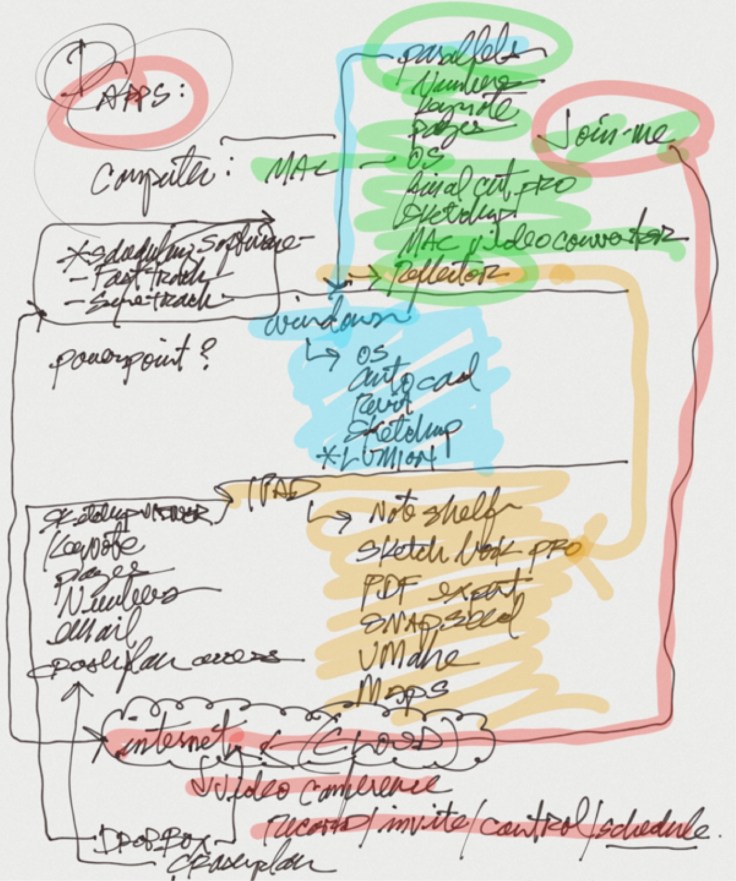
I’ll discuss more about drawing your network later- for now, sketch how it is structured.

If you can’t, you are in trouble.

Ours is simple, but complex.

Ours is always changing with technology – your is, too, whether you know it or not. If you don’t know where these changes are occurring, how will you know how they affect you – for better or worse? Try it.

See image of a sketch of ours:

img_1396

It’s rough, in process, and cleans up well (I’ll share more on that later), but without the ability to do this, how can you have a meaningful conversation with IT folks? How can you let them know your understanding (and therefore get correction from them – for BETTER UNDERSTANDING)?

And besides, how many IT folks KNOW how you need the elements of your design process to function together? Ours is not a typical nor simple business process. We in the design process do things with software many businesses do not. Don’t let IT marginalize what you are trying to do as typical. (We are currently doing things with some software set up – on our own – that we were later told we CAN’T, yet we are doing them, and they are working great…)

This is just software, hardware, 3D-printing, VR, connectivity (wireless, Bluetooth, etc. are addressed later) – things change and ours is like any other- changing…

This diagram represents AT LEAST two things:

Complexity of relationship in operation, AND flexibility of relationships of elements of our IT world – AND THEREFORE flexibility in our design process.

How well do you know yours?

Know it well.

Sleep with it. When I played football in high school our coach told us to sleep with the football…know it well, in your sleep, get comfortable around it, and WITH IT.

I encourage my office to “sleep with” the hardware (metaphorically) – play with it, know it. They take it home.

Only this way will you be comfortable with it when you need to have a conversation.

So, the take away today?

The technology of the design process has gotten complicated.

It doesn’t have to be – but it is for most of us. Know it. Well.

Get comfortable with it.

You (you and your technology) are going to be together working, playing, conversing with – and on behalf of each other – for a very long time.

Blog at WordPress.com.

Up ↑